For centuries, commerce was defined by physical exchange. We traded shells, then coins, then paper notes, and finally plastic cards. But in the last decade, a seismic shift has occurred. The wallet—that bulky leather accessory stuffed with receipts, cash, and cards—is disappearing. It is being digitized, encrypted, and migrated into the one device we never leave home without: our smartphone.
This is the era of the Mobile Wallet.
From tapping your iPhone to buy coffee in New York to scanning a QR code for street food in Bangkok, mobile wallets have transformed how the world moves money. They are faster, more secure, and infinitely more convenient than traditional payment methods. But how do they actually work? Are they safe from hackers? And in a crowded market of Apple Pay, Google Wallet, PayPal, and Venmo, which one should you use?
This comprehensive guide dives deep into the technology, security, and future of mobile wallets, helping you navigate the cashless revolution.
What is a Mobile Wallet?
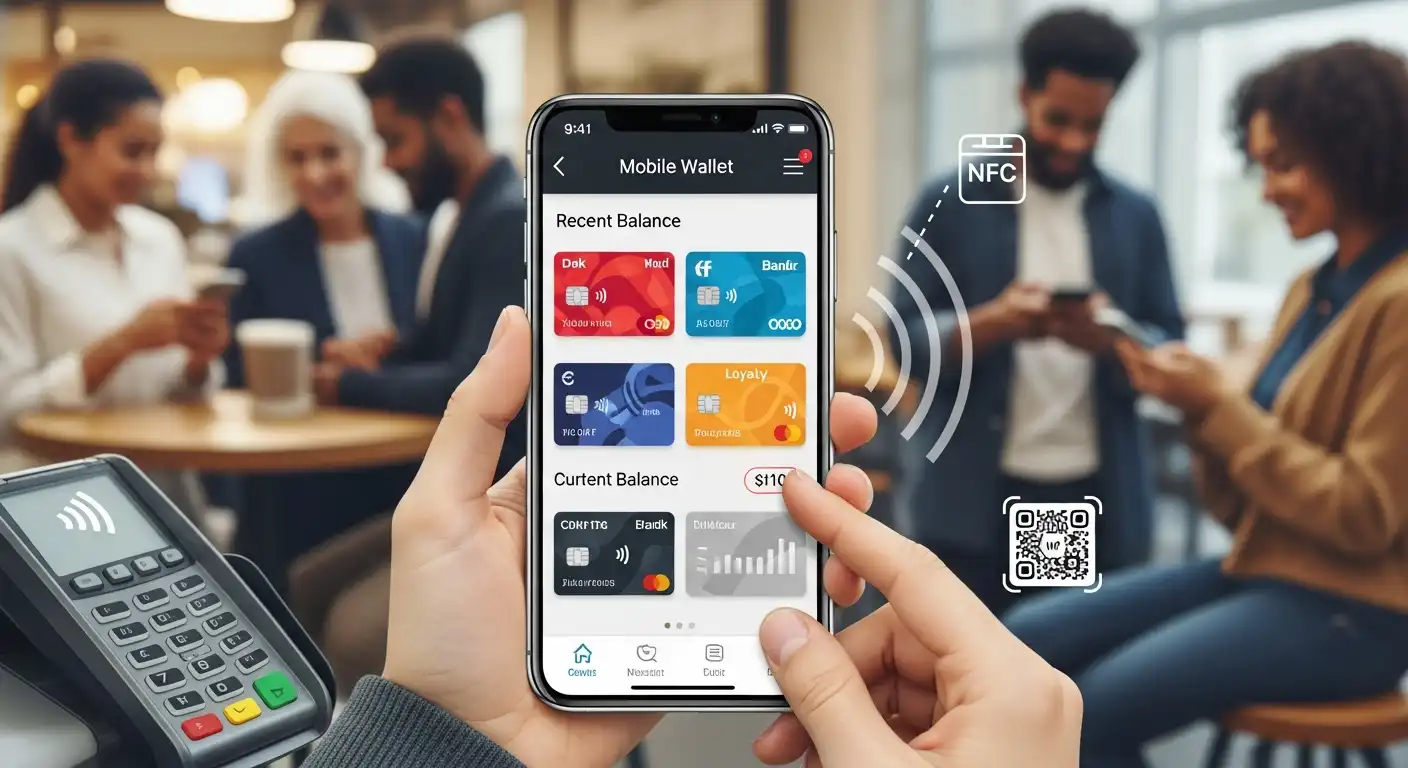
A mobile wallet is a virtual wallet that stores payment card information (credit and debit cards), loyalty cards, boarding passes, event tickets, and even government IDs on a mobile device.
It allows you to make payments in-store, in-app, or online without physically presenting a card or typing in numbers. While often used interchangeably with “Digital Wallet,” there is a subtle distinction: a digital wallet can live on a desktop computer (like PayPal), whereas a mobile wallet is specifically designed for the smartphone interface.
The Three Types of Mobile Wallets
The three major types of mobile wallet systems are given below.
- Open Wallets: These are accepted by most merchants and support multiple card types. Examples include Apple Pay, Google Wallet, and Samsung Pay.
- Semi-Closed Wallets: These allow you to pay at listed merchants or locations that have signed a contract with the wallet company. Examples include PayPal or Venmo (when used at specific retailers).
- Closed Wallets: These are specific to a single merchant. You can only use the funds at that store. The classic example is the Starbucks App or Walmart Pay.
How the Technology Works: NFC vs. MST vs. QR
When you “pay with your phone,” a complex technological handshake occurs in milliseconds. Three primary technologies are driving this interaction.
Near Field Communication (NFC)
This is the industry standard used by Apple Pay and Google Wallet. NFC allows two devices to communicate when they are within 4 centimeters of each other.
- The Process: You hold your phone near the contactless reader. A radio frequency field powers the transaction, transmitting encrypted data from your phone to the terminal. It’s the same tech used in “Tap to Pay” plastic cards.
Magnetic Secure Transmission (MST)
This was Samsung Pay’s secret weapon (though it’s being phased out in newer models). MST emits a magnetic signal that mimics the magnetic strip on a traditional credit card.
- The Benefit: It enabled Samsung phones to work with older card terminals that didn’t have NFC. You could hold your phone up to the slide reader, and the machine “thought” you swiped a card.
QR Codes (Quick Response)
Dominant in Asia (WeChat Pay, AliPay) and growing in the West (PayPal, Cash App), this method involves scanning a matrix barcode.
- The Process: Either the merchant displays a code for you to scan with your camera, or your app generates a code for the merchant to scan. It is incredibly cheap for merchants because they don’t need expensive NFC terminals—just a sticker or a smartphone.
The Security Fortress: Why It’s Safer Than Plastic
A common myth is that mobile wallets are risky. “What if I lose my phone? Will the thief drain my bank account?”
In reality, mobile wallets are significantly more secure than physical credit cards. Here is why.
Tokenization: The Invisible Shield
When you add your Visa card to Apple Pay, your actual credit card number is never stored on your phone or shared with the merchant. Instead, a unique string of random numbers—called a Token—is created.
- If hackers breach Target or Home Depot (as has happened historically), they only steal useless tokens, not your real card number. The token cannot be used outside of that specific transaction context.
Biometric Authentication
If you lose your physical wallet, a thief can swipe your credit card immediately. If you lose your phone, the thief hits a wall. Mobile wallets require Face ID, Touch ID, or a secure Passcode to authorize every single transaction. Without your face or fingerprint, the wallet is a vault that cannot be opened.
Remote Wipe Capabilities
Both iOS (Find My iPhone) and Android (Find My Device) allow you to instantly lock or erase your device remotely if it goes missing, deleting all payment keys from the secure element chip.
The Titans of the Industry: A Comparison
Choosing a wallet largely depends on your phone’s operating system, but the ecosystem is vast.
Apple Pay
- The Ecosystem: Integrated deeply into the iPhone, Apple Watch, iPad, and Mac.
- Pros: Incredible ease of use, widespread acceptance (NFC), high privacy (Apple doesn’t track what you buy), and “Apple Cash” for peer-to-peer (P2P) transfers via iMessage.
- Cons: Only works on Apple devices.
Google Wallet (formerly Google Pay)
- The Ecosystem: Available on all Android devices.
- Pros: extremely versatile. It stores not just payments but vaccine cards, car keys, and transit passes. It integrates with Gmail to automatically pull in boarding passes and loyalty cards.
- Cons: Google’s business model relies on data, raising some privacy concerns compared to Apple’s locked-down approach.
Samsung Pay (Samsung Wallet)
- The Ecosystem: Samsung Galaxy devices.
- Pros: Offers “Samsung Rewards” points for transactions. Still supports MST on older phones, offering the widest compatibility with legacy terminals.
- Cons: Bloatware. The app often includes ads and pushes for other Samsung services.
PayPal / Venmo
- The Ecosystem: App-based, works on both iOS and Android.
- Pros: The king of online checkout and P2P transfers. QR code payments are available at merchants like CVS.
- Cons: Not a native OS experience (you have to unlock the phone and open the app, unlike Apple Pay, which works instantly).
The Hidden Benefits: Loyalty and Budgeting
Mobile wallets are evolving from simple payment tools into comprehensive lifestyle managers.
Automatic Loyalty Points
Gone are the days of forgetting your punch card. Modern wallets automatically apply your Walgreens or Panera Bread loyalty account when you tap to pay. The wallet recognizes the merchant and applies the rewards in the background.
Expense Tracking
Unlike a credit card statement, which arrives once a month, mobile wallets provide instant push notifications. “You spent $4.50 at Starbucks.” Many wallets also provide spending summaries and maps showing exactly where each transaction took place, helping users spot fraud and manage budgets in real time.
The Global Divide: The West vs. The East
The adoption of mobile wallets tells a tale of two worlds.
- In the West (USA/Europe): Adoption has been gradual. We already had a robust credit card infrastructure, so the “pain point” wasn’t severe. Apple Pay is viewed as a convenience, not a necessity.
- In the East (China/India/Southeast Asia): Adoption was explosive. These regions largely skipped the “credit card era” and leaped straight from cash to mobile. In China, apps like WeChat Pay and Alipay are ubiquitous. You cannot function in society without them—even beggars on the street use QR codes. These apps are “Super Apps” that combine messaging, social media, taxi hailing, and payments into a single interface.
The Future: Killing the Leather Wallet
What comes next? Mobile wallets are moving to absorb the final contents of your physical wallet.
Digital IDs and DDriver’sLicenses
Several US states (like Arizona and Maryland) have already launched digital driver’s licenses in Apple Wallet. The TSA is beginning to accept digital IDs at airport security. Soon, proving your identity will be as simple as tapping your phone.
Digital Car Keys
Car manufacturers like BMW and Hyundai are integrating digital keys. You can unlock and start your car using the NFC chip in your phone, and even “text” a digital key to a friend so they can borrow your car for an hour.
Crypto Integration
Wallets are becoming the bridge to Web3. PayPal and specialized wallets now allow users to buy, hold, and pay with cryptocurrencies like Bitcoin directly in the app.
Conclusion
The mobile wallet is not just a digital version of a credit card; it is a fundamental reimagining of identity and commerce. It is safer, smarter, and cleaner than the dirty cash and plastic of the past.
While some holdouts worry about battery life (a valid concern—no battery means no money), the trajectory is undeniable. We are moving toward a frictionless, wallet-free world. So, the next time you leave the house, pat your pockets. If you have your phone, you have everything you need.