For over a decade, TechSmith’s Camtasia has held the title of the industry standard for screen recording and tutorial creation. While free tools like OBS Studio and quick-messaging apps like Loom have carved out their own niches, Camtasia remains the go-to choice for educators, corporate trainers, and YouTubers who need to produce polished, professional instructional content without learning Hollywood-level editing software.
However, with a premium price tag and a shift toward subscription models, is Camtasia still the king of screencasting in the current market? In this review, we dive deep into the latest version’s features, performance, and usability to see if it justifies the investment for your video creation workflow.
What is TechSmith Camtasia?
Camtasia is a hybrid software solution that combines a high-fidelity screen recorder with a feature-rich video editor. Unlike standard screen capture tools that simply dump a raw video file onto your desktop, Camtasia provides an end-to-end environment where you can record, edit, annotate, and export your content without ever leaving the application.
It is specifically designed to bridge the gap between simple screencasting and professional post-production, making it the ideal tool for users who need to explain complex software or concepts visually. It is widely used by the following groups:
- Corporate Trainers: For creating onboarding videos and compliance training.
- Educators: For developing flipped classroom content and online courses.
- Software Developers: For creating product demos and walkthroughs.
- YouTubers: Specifically, those in the “How-To” and tutorial niche.
Key Features and Capabilities
Camtasia distinguishes itself from competitors not by being the most complex editor, but by being the most specialized for screen content. Every feature is engineered to make recordings look cleaner, clearer, and more engaging with minimal effort.
Advanced Screen Recording
The heart of Camtasia is its recorder, which captures your screen with pixel-perfect accuracy. It allows for flexible inputs, meaning you can record your entire screen, a specific window, or custom dimensions, all while capturing system audio, microphone input, and a webcam feed simultaneously.
- Multi-Track Recording: The webcam, screen, and audio are recorded on separate tracks, allowing you to edit them independently later.
- Region Locking: Snap the recorder to specific application windows to ensure you don’t accidentally record your messy desktop background.
- Mobile Capture: Integration with the TechSmith Fuse app allows you to send footage from your iOS or Android device directly to the editor.
Specialized Cursor Effects
One of Camtasia’s unique selling points is its ability to manipulate the mouse cursor in post-production. Because the software records cursor data separately from the video pixels, you can resize, hide, or smooth out the mouse movement after you have finished recording.
- Cursor Smoothing: Automatically fix shaky mouse movements to create a smooth, professional path from point A to point B.
- Highlight and Magnify: distinct visual effects that spotlight the cursor or magnify the area under it to draw the viewer’s eye.
- Click Effects: Add visual ripples or auditory clicks whenever the mouse is pressed to provide visual feedback to the viewer.
Drag-and-Drop Editing and Assets
The video editor within Camtasia is built on a “timeline” concept similar to Adobe Premiere, but simplified for speed. It comes pre-loaded with a massive library of royalty-free assets, meaning you can add professional polish to a video without being a graphic designer.
- Dynamic Backgrounds: Motion graphics that sit behind your content to give it a high-production feel.
- Lower Thirds: Customizable, animated text overlays to introduce speakers or sections.
- Transitions and Behaviors: Drag-and-drop animations that make text and images fly, bounce, or fade onto the screen.
Audio and AI Integration
In recent updates, TechSmith has integrated AI tools to help salvage bad audio and speed up the editing workflow. Good audio is critical for tutorials, and Camtasia includes a suite of tools to clean up background noise and level out vocal tracks.
- Audiate Integration: Seamless sync with TechSmith’s Audiate software for text-based audio editing.
- Background Noise Removal: An algorithmic filter that removes hums, hisses, and fan noise from your microphone track.
- Emphasize Audio: A “ducking” feature that automatically lowers background music volume when the narrator is speaking.
Usability and Interface
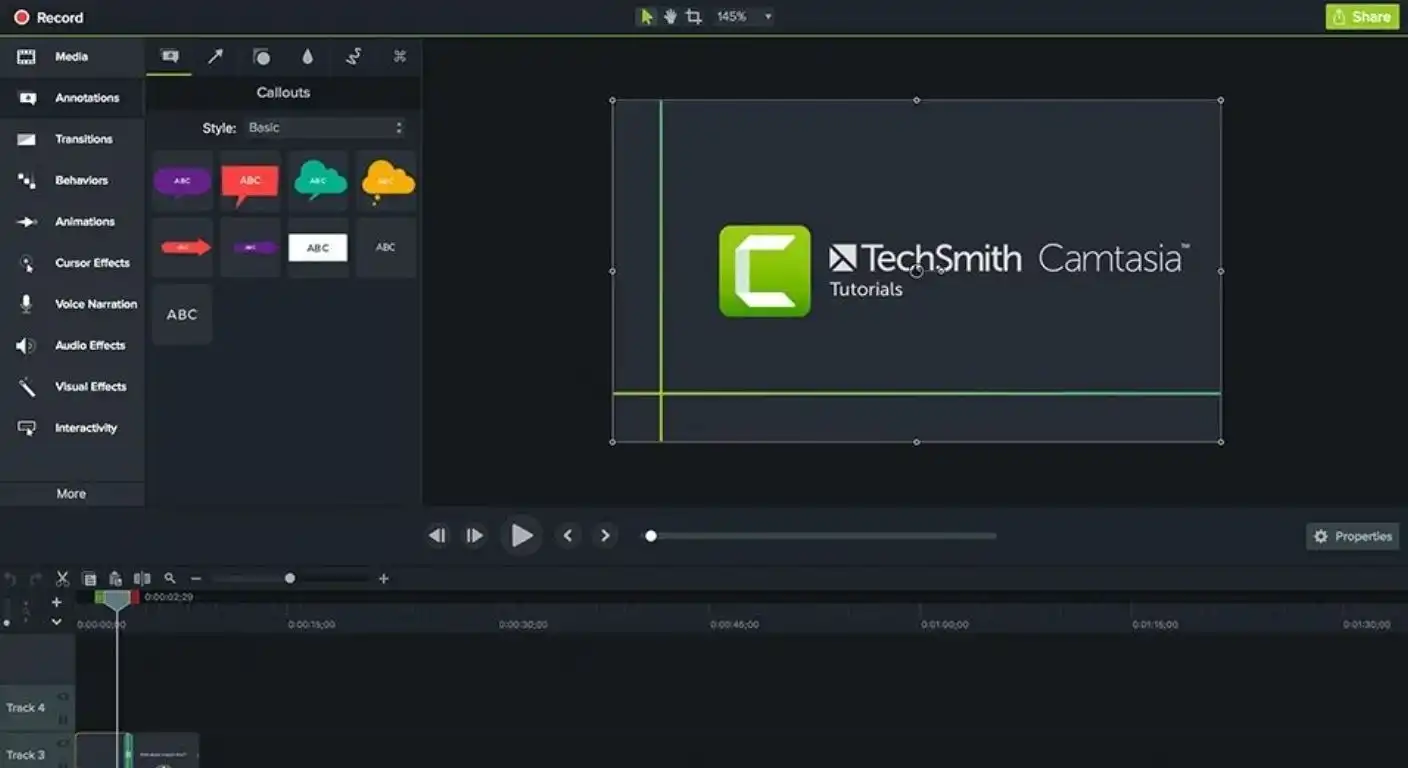
Camtasia is famous for its shallow learning curve; you can usually produce your first video within an hour of installation. The interface is clean, dark-mode friendly, and organized logically with the media bin and tools on the left, the canvas in the center, and the properties panel on the right.
The timeline is magnetic and intuitive, allowing you to stack media on top of each other to create layers. Unlike professional NLEs (Non-Linear Editors) that require memorizing complex hotkeys, almost everything in Camtasia can be accomplished by dragging an effect from the menu and dropping it onto a clip.
- The Canvas: A “what you see is what you get” editor where you can resize and move video elements directly on the screen.
- Properties Panel: A contextual menu that changes based on what you click, giving you precise control over opacity, scale, and volume.
- Favorites Tool: A customized tab where you can save your most-used transitions and effects for quick access.
Pros and Cons
While Camtasia is a powerhouse, it is not the perfect tool for every video project. It is essential to weigh the time-saving features against the cost and the limitations regarding high-end cinematic editing.
Pros:
- All-in-One Workflow: Eliminates the need to use separate software for recording and editing.
- Cursor Path Editing: The ability to edit mouse movements after recording is a game-changer for software demos.
- Asset Library: Includes high-quality intros, outros, and music that would cost money elsewhere.
- Interactivity: Allows you to add quizzes and hotspots to videos (when hosted on compatible players).
Cons:
- Price: It is significantly more expensive than competitors like OBS (free) or ScreenFlow.
- Rendering Heavy Projects: It can struggle with 4K projects that have many layers, sometimes lagging on older hardware.
- Limited Color Grading: Lacks the advanced color correction tools found in DaVinci Resolve or Premiere Pro.
Pricing and Plans
TechSmith has recently shifted its pricing model, moving primarily toward subscription-based access, though they often maintain options for perpetual licenses with maintenance contracts. It is generally priced as a premium business tool rather than a consumer app.
- Individual Subscription: An annual fee that guarantees you the latest version of the software and priority support.
- Perpetual License: A one-time fee (often higher) that owns the specific version forever, though upgrades to future versions cost extra.
- Bundle Options: Often sold in a bundle with “Snagit,” TechSmith’s screenshot and image annotation tool.
Conclusion
Camtasia remains the undisputed champion of instructional video creation. While it lacks the cinematic color grading and multi-cam features of Adobe Premiere Pro, it makes up for it with unmatched specialized tools for screen capture.
If you are a casual user just needing to record a quick bug report, free tools like Loom or OBS are sufficient. However, if your goal is to build a library of professional, evergreen educational content or polished software demonstrations, Camtasia’s ability to edit cursor data and add professional assets makes it worth every penny.